
Should I Use Pigment or Latex Ink for Hydrokon Printable Hydrographic Film
Jul 15th 2026
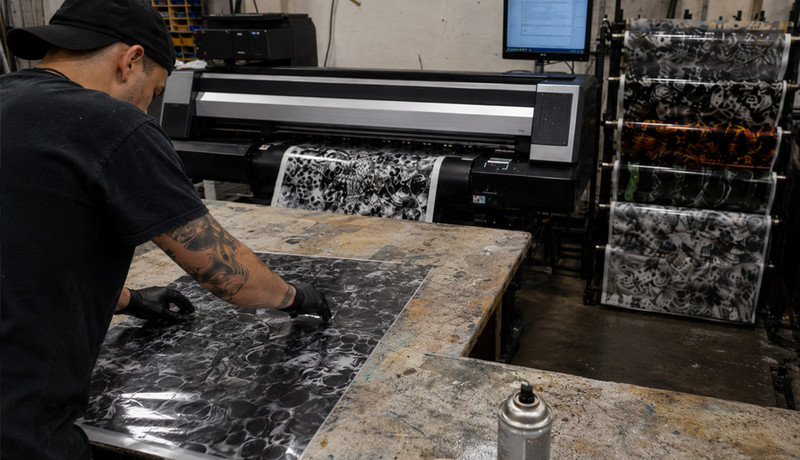
Printing hydrographic patterns in-house gives manufacturers greater control over artwork, production schedules, inventory, and intellectual property. However, achieving consistent results requires the right combination of printable film, ink, printer settings, drying time, and dipping technique.
When printing designs on Hydrokon Water Transfer Film, two common ink options are pigment and latex. Both can produce successful transfers, but they behave differently on printable hydrographic film and require different preparation before dipping.
This guide explains the practical differences between pigment and latex ink, when each option makes sense, and how to avoid common washout and adhesion problems.
READ MORE: Printer Info & Compatible Printer List
Quick answer
- Latex ink: Typically provides the simplest production workflow because the printed film is often ready to dip after it has dried properly.
- Pigment ink: Can produce sharp, detailed results but usually requires a light protective lacquer or fixative coat before dipping to prevent the image from washing out.
The best choice depends on your printing equipment, production volume, and the level of process control you want before the film reaches the dipping tank.
Why the Film Matters
Ink is only one part of the hydrographic printing process. The printable film must also accept the ink consistently, move reliably through the printer, and dissolve properly during activation and transfer.
Hydrokon Water Transfer Film gives manufacturers a blank, printable hydrographic film that can be customized in-house. Instead of relying exclusively on preprinted film from an outside supplier, users can print patterns as needed, adjust artwork more quickly, reduce dependence on minimum order quantities, and maintain greater control over proprietary designs.
Once the appropriate printer settings and production procedures have been established, Hydrokon can support both prototyping and repeatable production workflows.
How each ink behaves on printable hydrographic film
Pigment ink (common in many inkjet printers)
Pigment inks, which are common in many inkjet printers, use solid color particles suspended in a liquid carrier. They can deliver strong color, fine detail, and sharp image definition.
However, the printed image may need additional protection before exposure to the activator and dipping process. Without a protective layer, the ink may wash out, fade, smear, or become muddy during transfer.
A typical pigment ink workflow is:
Print → Dry → Apply a light lacquer or fixative coat → Dry again → Dip
The protective coating should be light and even. Applying too much coating can affect how the Hydrokon film hydrates, activates, and transfers.
Latex ink (often used in wide-format production)
Latex inks are designed to create durable, flexible prints and are often well suited for wide-format production environments. In many Hydrokon workflows, latex-printed film can be dipped after the ink has dried properly, eliminating the separate protective coating step.
A typical latex ink workflow is:
Print → Dry fully → Dip
Reducing the number of production steps can improve repeatability and make latex ink an attractive option for manufacturers running frequent hydrographic jobs.
Process differences that matter most
1) Pre-dip protection
- Pigment: Commonly requires a light lacquer or fixative coat to help lock the image in place.
- Latex: Often does not require an additional protective coating, simplifying the process.
2) Production consistency
- Pigment: Results depend partly on how evenly the protective coating is applied and how thoroughly it dries.
- Latex: Fewer preparation steps can mean fewer production variables once the printer settings have been established.
3) Workflow and Throughput
- Pigment: May be practical for prototyping, shorter runs, or operations that already own compatible inkjet equipment.
- Latex: May be better suited for production environments where speed, repeatability, and reduced handling are priorities.
Pigment ink: is it the better choice?
Potential pigment ink problems include:
- Ink washing out during activation or dipping
- Smearing caused by an overly heavy protective coating
- Inconsistent results when the coating has not dried completely
- Uneven film behavior caused by overspray or coating contamination
- Changes in color or image quality between print runs
These issues can often be reduced by standardizing the coating method, application amount, drying time, and environmental conditions.
Pigment ink can be a great fit when:
- You already own compatible pigment-based inkjet equipment
- You want to begin testing without investing immediately in a different printer
- You need sharp detail and strong image definition
- You are comfortable adding a controlled protective coating step
- Your production volume allows time for coating and additional drying
The key to success is applying a light, even protective coat and following a consistent drying schedule before dipping.
Latex ink: is it the better choice?
Potential latex ink problems include:
- Inconsistent transfers when the print has not dried completely
- Color shifts caused by changes to printer settings or profiles
- Variations caused by excessive ink density
- Film distortion caused by incorrect printer temperature or handling settings
- Differences between production runs when settings are not documented
Once the print profile and drying conditions are dialed in, latex ink can provide a straightforward and repeatable workflow.
Latex ink tends to shine when:
- You want a streamlined print, dry, and dip workflow
- You run hydrographic jobs frequently
- You value repeatability and reduced handling
- You want to minimize coating-related variables
- You need a scalable in-house printing process
- You want to produce patterns as needed rather than maintaining a large inventory of preprinted film
The key to success is ensuring that the print is completely dry and keeping printer settings and color profiles consistent between jobs.
Best Practices for Printing Hydrokon Water Transfer Film
Regardless of the ink system you use, the following practices can improve consistency:
- Print on the coated or matte side of the film.
- Confirm the correct side before loading a full roll.
- Allow the ink to dry completely before rolling, cutting, stacking, or dipping.
- Remember that drying time can vary based on temperature, humidity, ink coverage, and printer settings.
- Handle the printable surface carefully to avoid dust, oil, fingerprints, and other contamination.
- Begin with a small test pattern before committing to a full production run.
- Keep printer settings, color profiles, drying times, and coating procedures documented.
- Store Hydrokon film in a stable environment and protect it from moisture and major temperature changes.
- Evaluate the complete process rather than adjusting multiple variables at once.
A controlled test process makes it easier to determine whether a problem is related to the ink, printer settings, protective coating, activator application, hydration time, or dipping technique.
Troubleshooting: quick fixes
If the Ink Is Washing Out
For a pigment ink workflow:
- Confirm that a light protective coating was applied.
- Make sure the coating dried completely before dipping.
- Check that the coating was applied evenly without excessive buildup.
- Verify that you printed on the correct side of the film.
- Confirm that the activator is not being over-applied.
For a latex ink workflow:
- Confirm that the ink dried completely.
- Review the ink density, curing, and drying settings.
- Make sure the printer profile has not changed between runs.
If the Print Looks Dull or Inconsistent
- Confirm that the printer settings and profiles have remained unchanged.
- Check whether ink coverage is too light or too heavy.
- Inspect the printable surface for dust, fingerprints, or contamination.
- Review film storage conditions.
- Compare the results with a previously successful test print.
- Test one adjustment at a time to identify the source of the variation.
If the Film Behaves Inconsistently During Dipping
- Check hydration time and water temperature.
- Confirm that the activator is being applied evenly.
- Review the amount of protective coating used with pigment ink.
- Make sure the printed film was stored and handled properly.
- Confirm that printer heat settings did not distort or damage the film.
Final recommendation
For manufacturers seeking the most streamlined workflow, latex ink is often the easiest option once the printer settings and drying conditions have been established. Pigment ink can also produce excellent results on Hydrokon Water Transfer Film, particularly for companies that already have compatible printing equipment. However, it usually requires a consistent protective coating step to keep the printed image stable during activation and dipping.
The most important factor is not simply choosing pigment or latex ink. Successful in-house hydrographic printing depends on standardizing the entire process, from printing on Hydrokon film through drying, activation, dipping, rinsing, and finishing.
By combining the right ink technology with Hydrokon printable water transfer film, manufacturers can gain greater control over design changes, lead times, production quantities, and proprietary artwork. Need help evaluating your setup? Share your printer model, ink type, and intended application with the Hydrokon team. We can help you develop a practical test plan before moving into full production.